Monday, November 9, 2015

BI: Building the Data Warehouse Lesson 5

Writing the ETL SQL Script
Korry Kelley | Lesson 5


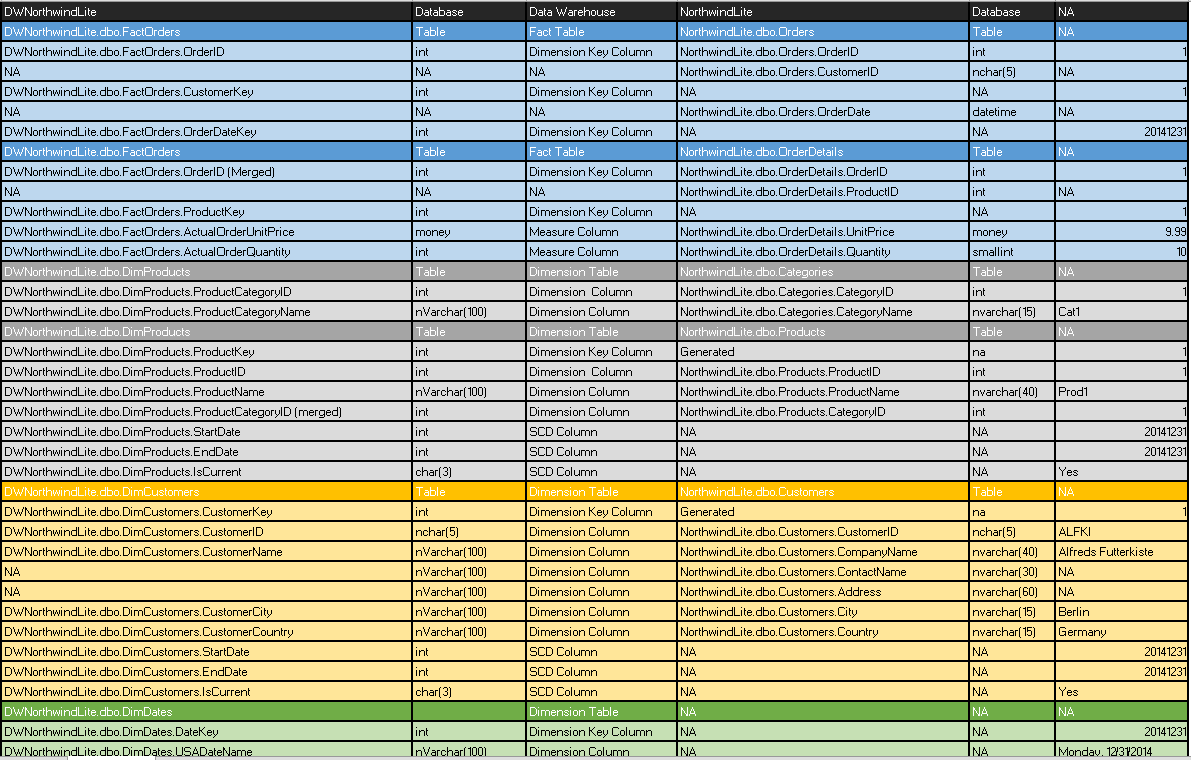
The image above illustrates the steps I took to plan the ETL solution

I used the SQL script below to implement the ETL solution:


/**************************************************************

 Create the Data Warehouse

*************************************************************/


--****************** [DWNorthwindLite] *********************--

-- This file contains ETL code for use with the

-- [DWNorthwindLite] database.

--****************** KorryK Version ***************************--


USE [DWNorthwindLite]

Go


--********************************************************************--

-- 1) Drop the FOREIGN KEY CONSTRAINTS and Clear the tables

--********************************************************************--

Alter Table [DWNorthwindLite].dbo.FactOrders Drop Constraint [FK_FactOrders_DimProducts]

Go

Alter Table [DWNorthwindLite].dbo.FactOrders Drop Constraint [FK_FactOrders_DimDates]

Go

Alter Table [DWNorthwindLite].dbo.FactOrders Drop Constraint [FK_FactOrders_DimCustomers]

Go


Truncate Table [DWNorthwindLite].dbo.DimProducts

Truncate Table [DWNorthwindLite].dbo.DimDates

Truncate Table [DWNorthwindLite].dbo.DimProducts

Truncate Table [DWNorthwindLite].dbo.FactOrders

go

--********************************************************************--

-- 2) FILL the Tables

--********************************************************************--


/****** [dbo].[DimProducts] ******/

INSERT INTO [DWNorthwindLite].dbo.DimProducts

SELECT

 [ProductID] = Products.ProductID

,[ProductName] = CAST(Products.ProductName as nVarchar(100))

,[ProductCategoryID] = Products.CategoryID

,[ProductCategoryName] = CAST(Categories.CategoryName as nVarchar(100))

,[StartDate] = 20000101

,[EndDate] = Null

,[IsCurrent] = 'Yes'

FROM [NorthwindLite].[dbo].[Categories]

INNER JOIN [NorthwindLite].dbo.Products

ON Categories.CategoryID = Products.CategoryID;

Go


/****** [dbo].[DimCustomers] ******/

INSERT INTO [DWNorthwindLite].[dbo].DimCustomers

Select

 [CustomerID] = Customers.CustomerID

,[CustomerName] = CAST(Customers.CompanyName as nvarchar(100))

,[CustomerCity] = CAST(Customers.City as nvarchar(100))

,[CustomerCountry] = CAST(Customers.Country as nvarchar(100))

,[StartDate] = 20000101

,[EndDate] = Null

,[IsCurrent] = 'Yes'

From [NorthwindLite].[dbo].[Customers]

Go


/****** [dbo].[DimDates] ******/


Declare @StartDate Datetime ='01/01/1999'

Declare @EndDate Datetime ='01/01/2004'


Declare @DateInProcess Datetime

Set @DateInProcess=@StartDate

--YEAR(@DateInProcess)+''+MONTH(@DateInProcess)+''+DAY(@DateInProcess)

While @DateInProcess<=@EndDate

 Begin

 Insert Into [DWNorthwindLite].[dbo].[DimDates]

 ([DateKey],[USADateName],[MonthKey],[MonthName],[QuarterKey],[QuarterName],[YearKey],[YearName])

 Values

 (

  CAST(FORMAT(@DateInProcess, 'yyyyMMdd') AS INT)

 ,DATENAME(WEEKDAY, @DateInProcess)+', '+CAST(MONTH(@DateInProcess) as nvarchar(100))+'/'+DATENAME(DAY,@DateInProcess)+'/'+DATENAME(YEAR,@DateInProcess)

 ,CAST(FORMAT(@DateInProcess, 'yyyyMM') AS INT)

 ,DATENAME(MONTH,@DateInProcess)+','+CAST(Year(@DateInProcess) as nVarchar(100))

 ,YEAR(@DateInProcess)+''+CAST(DATENAME(QUARTER,@DateInProcess) as int)

 ,'Quarter '+DATENAME(QUARTER,@DateInProcess)+', '+CAST(Year(@DateInProcess) as nVarchar(100))

 ,YEAR(@DateInProcess)

 ,CAST(Year(@DateInProcess) as nvarchar(100))

 )

 Set @DateInProcess=DATEADD(d,1,@DateInProcess)

 End

Go

--SELECT * FROM [DWNorthwindLite].[dbo].[DimDates]

Go


/****** [dbo].[FactOrders] ******/

Insert Into FactOrders

Select

 [OrderID] = [Orders].[OrderID]

,[CustomerKey] = [DimCustomers].[CustomerKey]

,[OrderDateKey] = CAST(FORMAT([Orders].[OrderDate], 'yyyyMMdd') AS INT)

,[ProductKey] = [OrderDetails].[ProductID]

,[AcualOrderPrice] = [OrderDetails].[UnitPrice]

,[ActualOrderQuantity] = [OrderDetails].[Quantity]

From [NorthwindLite].[dbo].[Orders]

Join [NorthwindLite].[dbo].[OrderDetails]

 On [NorthwindLite].[dbo].[Orders].[OrderID] = [NorthwindLite].[dbo].[OrderDetails].[OrderID]

Join [DWNorthwindLite].[dbo].[DimCustomers]

 On [NorthwindLite].[dbo].[Orders].[CustomerID] = [DWNorthwindLite].[dbo].[DimCustomers].[CustomerID]

Go


--********************************************************************--

-- 3) Re-Create the FOREIGN KEY CONSTRAINTS

--********************************************************************--

ALTER TABLE [DWNorthwindLite].[dbo].[FactOrders]  WITH CHECK ADD CONSTRAINT [FK_FactOrders_DimCustomers] FOREIGN KEY([CustomerKey])

REFERENCES [dbo].[DimCustomers] ([CustomerKey])

GO

ALTER TABLE [dbo].[FactOrders] CHECK CONSTRAINT [FK_FactOrders_DimCustomers]

GO


ALTER TABLE [dbo].[FactOrders]  WITH CHECK ADD  CONSTRAINT [FK_FactOrders_DimDates] FOREIGN KEY([OrderDateKey])

REFERENCES [dbo].[DimDates] ([DateKey])

GO

ALTER TABLE [dbo].[FactOrders] CHECK CONSTRAINT [FK_FactOrders_DimDates]

GO


ALTER TABLE [dbo].[FactOrders]  WITH CHECK ADD  CONSTRAINT [FK_FactOrders_DimProducts] FOREIGN KEY([ProductKey])

REFERENCES [dbo].[DimProducts] ([ProductKey])

GO

ALTER TABLE [dbo].[FactOrders] CHECK CONSTRAINT [FK_FactOrders_DimProducts]

GO


--********************************************************************--

-- Review the results of this script

--********************************************************************--

Select * from [dbo].[DimProducts]

Select * from [dbo].[DimCustomers]

Select * from [dbo].[DimDates]

Select * from [dbo].[FactOrders]

Monday, November 2, 2015

BI: Building the Data Warehouse Lesson 4

Building a New Data Warehouse to PM Specifications
Korry Kelley | Lesson 4


After studying the PMs specifications I was discern between what tables, fields and field types were required for the clients Data Warehouse.
 
 
USE [MASTER]
GO
If Exists (Select * from Sysdatabases Where Name = 'DWNorthwindLite')
 Begin
  ALTER DATABASE [DWNorthwindLite] SET SINGLE_USER WITH ROLLBACK IMMEDIATE
  DROP DATABASE [DWNorthwindLite]
 End
GO
Create Database [DWNorthwindLite]
Go
--********************************************************************--
-- Create the Tables
--********************************************************************--
USE [DWNorthwindLite]
Go
/****** [dbo].[DimProducts] ******/
Create Table DimProducts
(
ProductCategoryID int NOT NULL,
ProductCategoryName nVarchar(100)NOT NULL,
ProductKey int NOT NULL PRIMARY KEY,
ProductID int NOT NULL,
ProductName nVarchar(100)NOT NULL,
StartDate int NOT NULL,
EndDate int NOT NULL,
IsCurrent char(3) NOT NULL,
);
Go
/****** [dbo].[DimCustomers] ******/
Create Table DimCustomers
(
CustomerKey int NOT NULL PRIMARY KEY,
CutomerID nChar(5) NOT NULL,
CustomerName nVarchar(100) NOT NULL,
CustomerCity nVarchar(100) NOT NULL,
CustomerCountry nVarchar(100) NOT NULL,
StartDate int NOT NULL,
EndDate int NOT NULL,
IsCurrent char(3) NOT NULL,
);
Go
/****** [dbo].[DimDates] ******/
Create Table DimDates
(
DateKey int NOT NULL PRIMARY KEY,
[Date] datetime NOT NULL,
USADateName nVarchar(100),
MonthKey int NOT NULL,
[MonthName] nVarchar(100),
QuarterKey int NOT NULL,
QuarterName nVarchar(100),
YearKey int NOT NULL,
YearName nVarchar(100),
);

Go
/****** [dbo].[FactOrders] ******/
Create Table FactOrderDetails
(
OrderID int NOT NULL,
CustomerKey int NOT NULL,
OrderDateKey int NOT NULL,
ProductKey int NOT NULL,
ActualOrderUnitPrice money,
AtualOrderQuantity int,
CONSTRAINT [FactOrders] PRIMARY KEY CLUSTERED
 ([CustomerKey] ASC,[OrderDateKey] ASC,[ProductKey] ASC)
);
Go
--********************************************************************--
-- Create the FOREIGN KEY CONSTRAINTS
--********************************************************************--
USE [DWNorthwindLite]
Go
ALTER TABLE [FactOrderDetails] WITH CHECK ADD CONSTRAINT [FK_FactOrderDetails_DimDates] FOREIGN KEY([OrderDateKey])
REFERENCES [DimDates]([DateKey])
Go
ALTER TABLE [FactOrderDetails] WITH CHECK ADD CONSTRAINT [FK_FactOrderDetails_DimCustomers] FOREIGN KEY([CustomerKey])
REFERENCES [DimCustomers]([CustomerKey])
Go
ALTER TABLE [FactOrderDetails] WITH CHECK ADD CONSTRAINT [FK_FactOrderDetails_DimProducts] FOREIGN KEY([ProductKey])
REFERENCES [DimProducts]([ProductKey])
Go

--********************************************************************--
-- Review the results of this script
--********************************************************************--
Select 'Database Created'
Select Name, xType, CrDate from SysObjects
Where xType in ('u', 'PK', 'F')
Order By xType desc, Name
 
Using the SQL Script above I implemented the data warehouse and created all the required Primary and Foreign key constraints.


The above image illustrates the specific tables and relationships


Sunday, October 25, 2015

BI: Building the Data Warehouse Lesson 3

Designing a New Data Warehouse Blue Print
Korry Kelley | Lesson 3


In this lesson I have loaded and reviewed the NorthwindLite DB and determined what fields I needed to include in my data warehouse blue print. Please see details illustrated and called out below:


The image above illustrates that I’ve loaded the NorthwindLite OTLP and table/field associations and key connectors.


The image above illustrates the source NorthwindLite OLTP fields and naming convention
    
The image above illustrates the fields I chose to include from the source into my data warehouse blueprint
§  I chose to convert all Key Fields to int type
§  Any ‘Money’ types I chose to convert to ‘decimal(18,4)’ to avoid any compatibility issues
§  For any char types in the source I chose to convert to either ‘nvarchar(30)’ or ‘nvarchar(35)’ for consistency (Size) and compatibility (Unicode)


Sunday, October 18, 2015

BI: Building the Data Warehouse Lesson 2

Microsoft Procurement BI Solution Planning Process
Korry Kelley | Lesson 2


Above summarizes the initial business need and what the high level requirements are with regard to the Microsoft Procurement Spend BI Solution.


Above defines naming conventions and states required tables and process needed for each of early step in the development process.


Above defines the required attributes and the source they can be located and designates the data type they need to be


Above are the team members on this project


Above are the roles the team members are going to be responsible for


Above is the estimated project timeline to complete BI Solution


Above illustrates that the ProcurSpend data base has been created with all required tables in the table tree, as well as, the table mapping by primary and foreign keys tying the Dimensions Tables to the Fact Table.